CSS
CSS = Cascading Style Sheet
Vocabulary & Syntax
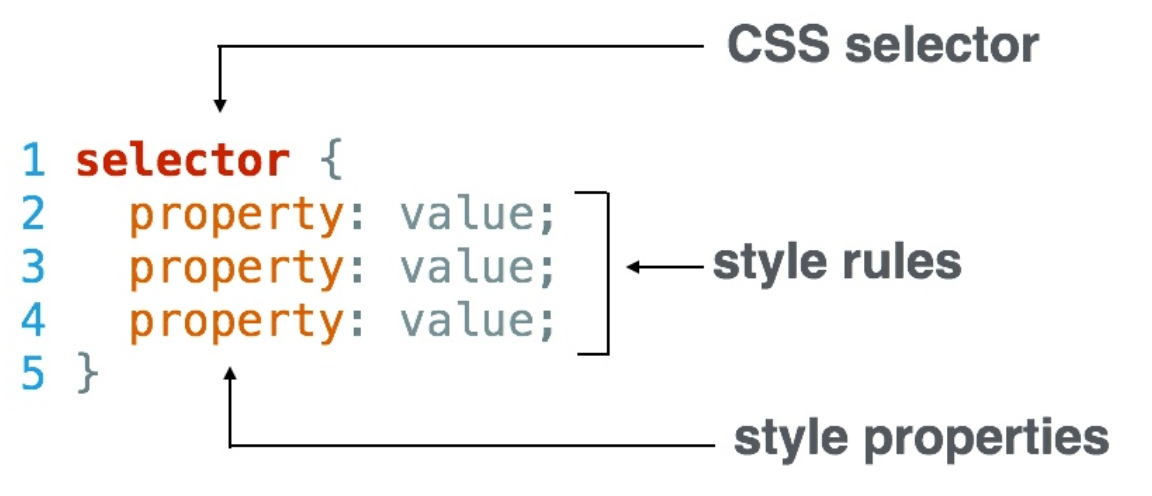
- CSS-Selector — are used to "find" (or select) HTML elements based on their element name
tag, id#, class., attribute, and more. - styling-rules — are inside the curly brackets
{} - style property — for example
width,colororfont-size - property-value — for example
100px,redor14px. Value is surrounded by quotations marks"".
Multiple CSS-Selectors
/* seperated by comma
 * can be classes, id's or tags, doesnt really matter */
h1, h2, p,
.banners, .container,
#top-logo, #footer-logo {
  property: value;
  property: value;
  property: value;
}
Linking CSS and HTML
Linking via CSS-File
<!-- add link in HEAD -->
<head>
  <link rel="stylesheet" type="text/css" src="css/style.css">
</head>
Linking with style tag
<!-- add style in HEAD -->
<head>
  <style>
    body {
      /* CSS styling for body here */
    }
    p {
      /* CSS styling for paragraph */
    }
  </style>
  <link rel="stylesheet" src="css/style.css">
</head>
Inline-Linking
<!--  -->
<p style="color: white; background-color: black;">
  white text on black background
</p>
Structure and Specificity
cascading order = the most specific css-selector is applied! Less specific selectors will be overriden.
- tagname: least specific
- class: more specific, recurrent styling
- id: most specific. One element per id only, applying the same id to multiple elements is invalid HTML and should be avoided
/* tag-level */
body { }

/* class-level */
#myClass { }

/* id-level */
.myId { }
Multiple Classes
<!-- HTML -->
<p class="bold italic">this will be bold and italic</p
/* CSS */
.bold {
  font-weight: bold;
}
.italic {
  font-style: italic;
}
Conflicts (multiple class)
- Ordering of selectors with same specificity does matter inside the CSS-file
- CSS-file: when two css-selectors have the same specificity (e.g. they are both classes) and conflicting styles, then the style of the selector is applied that is written at the end of the file (the latest instruction is applied)
<!-- HTML -->
<p class="red green">
  wil be displayed red, not green! (.red is later defined than .green)
</p>
/* CSS */
.green {
  color: green;
}
.red {
  color: red;
}
- Notice that the ordering of the class-attribute-values inside the HTML-tag does not matter, e.g.
<p class="red green">will render the same as<p class="green red">. - a chained class-selector is more specific than an pure class selector, but less specific than a id-selector!
<!-- HTML -->
<p id="my-name" class="red">Hans Müller</p>
/* CSS */
.red {color: red;}
p.red {color: darkred;}
#my-name {color: hotpink;}

/* text will be displayed hotpink
 * ordering in the css file does not impact the outcome,
 * since none of the css-selectors has the same specificty!
 * -> id > chained class > class */
Chaining Selectors
We have 3 types of selectors name, class and id. We can combine these 3 different types by chaining them. We have to respect some rules:
- chaining always works with the
.or#operator. - no spaces! Spaces are used for nesting, which is a different concept!
- if you include a name-selector, start with the name-selector
- you can't chain multiple name-selectors (one element cant be part of two tags)
- if you want to use two tagnames, you probably want to use nesting
- chain as much class-selectors as you want by adding
.classname - you can chain also one id-selector by adding
#idname
Combinations of Names, Classes, IDs
/* name */
h1 { ... }

/* name & class */
h1.class1 { ... }

/* classes */
.red.bold { ... }

/* classes & id */
.red.bold#id1 { ... }

/* name & classes */
h1.class1.class2.class3 { ... }

/* name & id */
h1#id1 { ... }

/* name & classes & id */
/* ordering doesnt matter */
h1.red.bold#id1 { ... }
h1.bold#id1.red { ... }
Accsessing Nested Elements
<!-- HTML -->
<ul class="main-list">
  <li>orange</li>
  <li>apple</li>
  <li>lemon</li>
</ul>
/* CSS */
.main-list li {
  color: red;
}
!important
- There is one thing that is even more specific than IDs:
!important. It can be applied to specific attributes instead of full rules. It will override any style no matter how specific it is. As a result, it should almost never be used. Once!importantis used, it is very hard to override. - If you ever see
!importantused (or are ever tempted to use it yourself) we strongly recommend reorganizing your CSS.
<!-- HTML -->
<p id="green">not green!</p>
/* CSS */
#green {color: green;}
p {color: blue !important}

/* !important overrides even the id-selector!*/
Backgrounds / Images
/* TRANSPARENT FILTER ON IMAGES -> makes text in front more visible */
Colors
There are 3 types how color can be displayed:
- Color Names — around 140 predefined names. Some names are assigned the same color, for example
greyandgrayrepresent the same color. - RGB(a) — red, green, blue encoding (0-255). Total of 16.5 MIO colors acn be represented in this spectrum.
- HEX — same logic as RGB, but different encoding.
- HSL(a) —
Some Examples
/* Text Color */
color: white;

/* Background */
background-color: black;
background-image: url("url");

/* Colors */
color: black;
color: #333333;
color: rgb(0,0,0);
color: rgba(0,0,0, 1.0);
Color Names
Some Colornames
All Colornames (alphabetically)
AliceBlue, AntiqueWhite, Aqua, Aquamarine, Azure, Beige, Bisque, Black, BlanchedAlmond, Blue, BlueViolet, Brown, BurlyWood, CadetBlue, Chartreuse, Chocolate, Coral, CornflowerBlue, Cornsilk, Crimson, Cyan, DarkBlue, DarkCyan, DarkGoldenRod, DarkGray, DarkGrey, DarkGreen, DarkKhaki, DarkMagenta, DarkOliveGreen, DarkOrange, DarkOrchid, DarkRed, DarkSalmon, DarkSeaGreen, DarkSlateBlue, DarkSlateGray, DarkSlateGrey, DarkTurquoise, DarkViolet, DeepPink, DeepSkyBlue, DimGray, DimGrey, DodgerBlue, FireBrick, FloralWhite, ForestGreen, Fuchsia, Gainsboro, GhostWhite, Gold, GoldenRod, Gray, Grey, Green, GreenYellow, HoneyDew, HotPink, IndianRed , Indigo , Ivory, Khaki, Lavender, LavenderBlush, LawnGreen, LemonChiffon, LightBlue, LightCoral, LightCyan, LightGoldenRodYellow, LightGray, LightGrey, LightGreen, LightPink, LightSalmon, LightSeaGreen, LightSkyBlue, LightSlateGray, LightSlateGrey, LightSteelBlue, LightYellow, Lime, LimeGreen, Linen, Magenta, Maroon, MediumAquaMarine, MediumBlue, MediumOrchid, MediumPurple, MediumSeaGreen, MediumSlateBlue, MediumSpringGreen, MediumTurquoise, MediumVioletRed, MidnightBlue, MintCream, MistyRose, Moccasin, NavajoWhite, Navy, OldLace, Olive, OliveDrab, Orange, OrangeRed, Orchid, PaleGoldenRod, PaleGreen, PaleTurquoise, PaleVioletRed, PapayaWhip, PeachPuff, Peru, Pink, Plum, PowderBlue, Purple, RebeccaPurple, Red, RosyBrown, RoyalBlue, SaddleBrown, Salmon, SandyBrown, SeaGreen, SeaShell, Sienna, Silver, SkyBlue, SlateBlue, SlateGray, SlateGrey, Snow, SpringGreen, SteelBlue, Tan, Teal, Thistle, Tomato, Turquoise, Violet, Wheat, White, WhiteSmoke, Yellow, YellowGreen
RGB(a)
- Red, Green, Blue.
color: rgb(R, G, B)- red:
rgb(255, 0, 0) - green:
rgb(0, 255, 0) - blue:
rgb(0, 0, 255)
Grey Scale (Black / White)
when all values for R, G and B are the same, we move across a greyscale where 0 is black and 255 is white!
/* black */
rgb(0,0,0)

/* dark grey */
rgb(20,20,20)

/* light grey */
rgb(220,220,220)

/* white */
rgb(255,255,255)
Alpha-Channel (Opacity)
- Syntax:
color: rgba(R,G,B,a) - transparent when
a=0 - no opacity when
a=1(default when using rgb)
HEX
Each of the 6 HEX-values can be [0-9][A-F], which make up to 16 possibilities: (16x16, 16x16, 16x16) = (0-255, 0-255, 0-255).
DEC -> HEX
rgb(0,0,0) = #000000rgb(255,255,255) = #FFFFFF
Abbreviations
#000000 = #000#FFFFFF = #FFF#AA33BB = #A3B
Table
| Decimal | Binary | Hex |
|---|---|---|
| 0 | 0000 0000 | 0 |
| 1 | 0000 0001 | 1 |
| 2 | 0000 0010 | 2 |
| 3 | 0000 0011 | 3 |
| 4 | 0000 0100 | 4 |
| 5 | 0000 0101 | 5 |
| 6 | 0000 0110 | 6 |
| 7 | 0000 0111 | 7 |
| 8 | 0000 1000 | 8 |
| 9 | 0000 1001 | 9 |
| 10 | 0000 1010 | A |
| 11 | 0000 1011 | B |
| 12 | 0000 1100 | C |
| 13 | 0000 1101 | D |
| 14 | 0000 1110 | E |
| 15 | 0000 1111 | F |
| 16 | 0001 0000 | 10 (1+0) |
| 17 | 0001 0001 | 11 (1+1) |
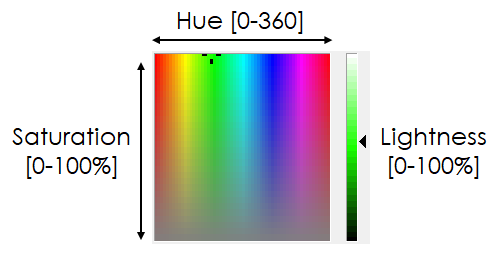
HSL(a)
IMPORTANT: Better use RGB or HEX, since HSL is not supported in all versions of all browsers.
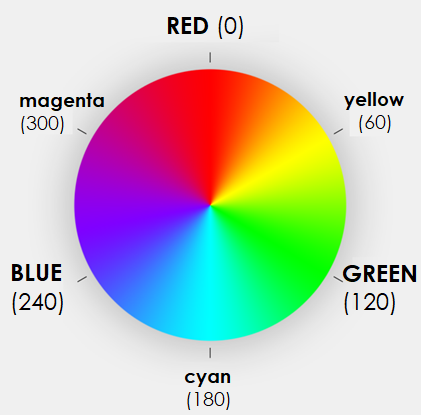
- Hue: Value between 0-360. Degree on the color-circle:
0:red, 120:green, 240:blue. - Saturation: Percentage 0-100% (or 0-1). Mixes the color with grey:
100%:pure, 0%:grey - Lightness: Percentage 0-100% (or 0-1). Normal value is 50%:
0%:black, 50%:normal, 100%: white - a: Percentage 0-100% (or 0-1). alpha-channel = opacity. Optional parameter, works the same as with RGB:
0:transparent, 1:no-opacity
hsl(0,   1, 0.5)   /* =red   =rgb(255,0,0) */
hsl(120, 1, 0.5)   /* =green =rgb(0,255,0) */
hsl(240, 1, 0.5)   /* =blue  =rgb(0,0,255) */

/* percentage format*/
hsl(0,   100%, 50%)
hsl(120, 100%, 50%)
hsl(240, 100%, 50%)

/* with alpha channel (different levels) */
hsl(0, 100%, 50%, 0)
hsl(0, 100%, 50%, 0.1)
hsl(0, 100%, 50%, 1)    /* standard setting */
Hue Saturation Lightness Overview
Color Circle (Hue)
Red (0)Green (120)Blue (240)
Text Properties
/* Basic Fontstyle */
font-family: Arial;
color: red;

/* Size (px VS em)*/
font-size: 16px;
font-size: 100%;
font-size: 0.8em;
font-size: 1em;

/* Font-Style */
font-style italic;
font-weight: normal; /* = 400 */
font-weight: bold;   /* = 700 */
font-weight: 900;    /* valid values: 100,200,300,..,900 */

/* Text Decoration */
text-decoration: none;
text-decoration: overline;
text-decoration: line-through;
text-decoration: underline;
text-decoration: underline line-through overline;   /* all combined! */

/* Alignment */
text-align: center;
text-align: left;
text-align: right;
text-align: justify;   /* block */

/* Transform Text */
text-transform: capitalize;
text-transform: uppercase;
text-transform: lowercase;

/* Paragraph / Spacing */
line-height: 1.6;
letter-spacing: 3px;
CSS Box Model
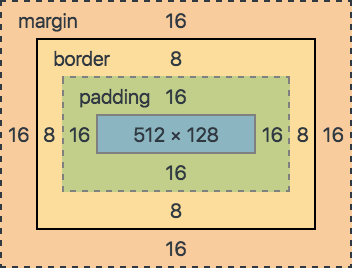
- margin (Platz ausserhalb vom Rand)
- border (Rand)
- padding (Platz zwischen Rand und Inhalt)
- content (Inhalt)
Example
div {
    padding: 10px;
    border: 2px;
    margin: 10px;
}
Border
/* thickness, style and color in 1 statement! */
border: px style color;
border: 12px solid red; /* dotted, dashed, double, none */

/* make borders round */
boder-radius: 10px
boder-radius: 100% (=circle)
Padding
/* PADDING */
padding: 10px; /* = on all sides 10px!*/

/* same as...*/
pading-top: 10px;
pading-right: 10px;
pading-bottom: 10px;
pading-left: 10px;

/* padding: v1 v2 v3 v4; -> top / right / bottom / left
 * padding: v1 v2 v3;    -> top / right+left / bottom
 * padding: v1 v2;       -> top+bottom / right+left
 */
Margin
/* - same as padding concerning syntax
 * - space between border and other elements!
 * - margins add up horizontally!
 * - margins collapse vertical (higher is applied)
 */

maring: 0 auto

/* MIN / MAX SIZE */
min-width: 200px;
max-width: 400px;
min-height: 200px;
max-height: 400px;
OPEN QUESTIONS
- best practice in CSS? Is it right that styles like "red" and "bold" should NOT be defined as classes, since then we "style" the content already inside the html code. If we want to redesign (choose other colors) then we have to rename our classnames in the HTML (thus chaning the HTML code), since we dont want a classname "green" having another color. Thats is painfull, am I right? Any pro tips / experiences with this?
<!-- VERSION 1 -->
<h1 class="red bold">my heading</h1>
.red {color: red;}
.bold {font-weight: bold;}

<!-- VERSION 2 -->
<h1 class="style1">my heading</h1>
.style1 {color:red; font-weight:bold;}

<!-- VERSION 3 -->
<h1 class="style1">my heading</h1>
h1.style1 {color:red; font-weight:bold;}
- Nested Elements: whats the use-case for this? I cant imagine any scenario where this is needed or cannot be acomplished with better classnames? I think its more clear to write more specific classnames than using this solution:
/* why doing this? */
.main-container h1 { property-value }

/* instead of this */
.main-container-h1 {property-value }

/* obviously you have to write it down all the time, that sucks
 * but for styling its much clearer? Aaah or maybe not, idk lol!